The Apache .htaccess file is often used to modify how users interact with websites, such as:
- adding a trailing slash to directories
- load a default file if not specified in the URL (.htaccess DirectoryIndex)
- password protecting directories using Basic Authorisation
- the ability to list files in a directory (.htaccess +indexes option)
CloudFront can provide similar functionality using CloudFront Functions as well as Lambda@edge. Although CloudFront Functions provide less functionality, they are fast and relatively easy to implement if you know EMACScript.
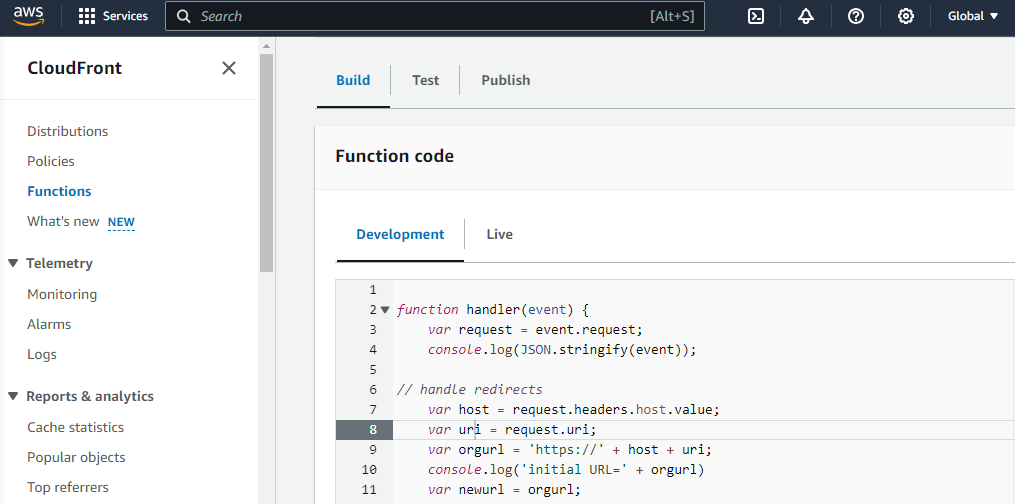
From the left navigator of main CloudFront GUI (if not visible, click on the three bars), select Functions, click on Create function, give a name, and click on Create function. The function GUI displays three tabs and a prototype function.
Build provides a simple JavaScript editor. Although it does not appear to do syntax checking, selecting braces and brackets shows what the editor believes is the matching brace/bracket.
Test (https://docs.aws.amazon.com/AmazonCloudFront/latest/DeveloperGuide/test-function.html) allows you to exercise your script, passing the URI as well as headers such as "host" (required if the function relies on the hostname). If you are passing information via the headers, use the Save button at the top retain the settings so that you do not need to retype information. If you have syntax or logic errors, go back to Build to correct them. The Test function button runs the test and shows you the output. Any console.log() calls will also be logged. The Test tab also shows a "Compute utilization" value. CloudFront functions have access to a limited amount of computing time - utilisation above 50% may mean the function will be throttled (exactly what that means is not clear).
Publish makes your function live and allows you to associate it with a Distribution endpoint. The function will now be called every time the Distribution endpoint is accessed, allowing you to modify information on the fly before it is passed to AWS Serverless or set a 301/302 status code to redirect via the user's browser. Any console.log() calls are logged and can be viewed via CloudWatch.
Although there is a lot of AWS documentation (https://docs.aws.amazon.com/AmazonCloudFront/latest/DeveloperGuide/cloudfront-functions.html) and some sample code (https://github.com/aws-samples/amazon-cloudfront-functions), I could not find practical examples covering the .htaccess rewrite functions that my existing websites relied on. One of the restrictions is that a CloudFront distribution endpoint can only be associated with one CloudFront function. I created a CloudFront prototype function that I can tailor for the specific website as I migrate them to AWS Serverless. I added removing double-slashes which Apache supports but AWS Serverless rejects - CloudFront Functions does not support replaceAll() so I had to learn the regex version of the replace() function. I have not figured out how to list website directories, but that is not recommended anyway. The function applies Basic Authentication to anything in a 'restricted' folder - the entire website can be protected by removing the folder check. The function also looks for the default 'index.html' in all folders, not just the root folder supported through the CloudFront configurtion.
function handler(event) {
   var request = event.request;
   console.log(JSON.stringify(event));
// common variables
   var uri = request.uri;
// handle redirects
   var host = request.headers.host.value;
   var orgurl = host + uri;
   console.log('initial URL=' + orgurl);
   var newurl = orgurl;
   // redirect www.
   if (newurl.includes('/www.')) {
       console.log('redirect www.');
       newurl = newurl.replace('/www.','/');
   }
   // remove one more more occurrences of double slashes
   if (newurl.includes('//')) {
       console.log('remove double slashes in ' + newurl);
       newurl = newurl.replace(/\/\//g,'/');
   }
   // redirect /work/zq##/ to /editions/zq##.html
   if (newurl.includes('/work/')) {
       console.log('rewrite work to editions');
       var newurl = newurl.replace('/work/','/editions/') + '.html';
   }

   // redirect permanently if required
   if (newurl != orgurl) {
       console.log('permanent redirect to ' + newurl);
       return {
           statusCode: 301,
           statusDescription: 'Found',
           headers: { "location": { "value": 'https://' + newurl } }
       }
   }
// Password-protect accress to files in a /restricted/ folder
   if ((uri.includes('/restricted/')) || (uri.endsWith('/restricted'))) {
       var user = '<username>';
       var pass = '<password>;
       var requiredAuth = "Basic " + `${user}:${pass}`.toString('base64');
       var authHeaders = event.request.headers.authorization;
       if (authHeaders == null || authHeaders.value !== requiredAuth) {
           return {
               statusCode: 401,
               statusDescription: "Unauthorized",
               headers: { "www-authenticate": { value: 'Basic realm="Application"' } }
           }
       }
   }
// Internally redirect to default 'index.html'
   // check whether the URI is missing any file name
   if (uri.endsWith('/')) {
       console.log('missing file name');
       uri += 'index.html';
   }
   // check whether the URI is missing a file extension
   else if (!uri.includes('.')) {
       console.log('missing trailing slash and file name');
       uri += '/index.html';
   }
// continue processing request with possible updated URI
   console.log('uri=' + uri);
   request.uri = uri;
   return request;
}
I ran into a few issues with CloudFront Functions. If the function accesses the 'host' property, the hostname must be specified in the Test headers. I assumed the hostname would include the protocol (http:// or https://) but it does not. - so far, I have not figure out how to retrieve the protocol. When I initially built the new URL without explicitly adding https://, it was treated by CloudFront as a relative URL, resulting in a loop that eventually failed with you guessed it) "AccessDenied". Logging is your friend...
Blog comments1
Good details, Norbert!…
Good details, Norbert! Thanks for sharing